


Emails are the lifeblood of any SaaS business. Whether bringing all team members on board with the latest company news or staying in touch with your customers, thoughtful email communication can make business much more manageable.
Alas, simply sending emails isn’t enough to gain long-term subscribers. What you need is consistent high email delivery and a reliable tool that can provide accurate analytics.
Postmark is one such email delivery tool that boasts of an extensive API library and stellar deliverability.
But is it the only player in the market that can guarantee results?
In this article, we will explore Postmark in detail and see its best alternative.
What is Postmark?
Founded in 2010, Postmark is an online email management tool that helps businesses use its services for streamlined and effective email delivery.

Apart from providing email APIs, it supports its customers with the following products.
Transactional emails- sharing time-sensitive information with unique customers based on their purchases and user actions. For example– generating and sending invoices to a customer who ordered a product.
SMTP service- setting up SMTP framework for quick and safe email delivery.
Email templates- ready-to-use email templates for transactional and promotional messages.
Custom integrations- easy integrations with third-party tools like Google Sheets, WordPress, Slack, and many more, for a cohesive environment.
Detailed performance metrics- to get accurate insights into the delivery history and filter reports for regular improvements.
Why is Postmark So Popular?
1. Fast Email Delivery
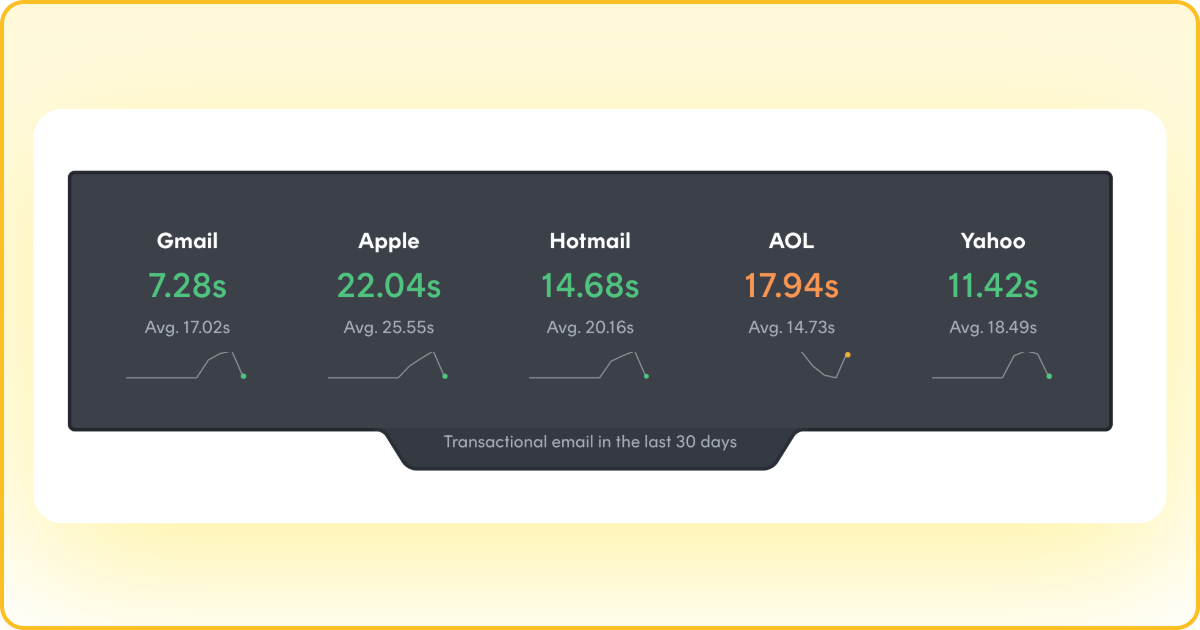
Postmark delivers billions of emails every day. While timely delivery is crucial for any message, it becomes even more critical for transactional emails, where even a slight delay can flood your support team with queries.
Postmark shares its real-time delivery performance for all major inboxes.
2. Reliable Troubleshooting
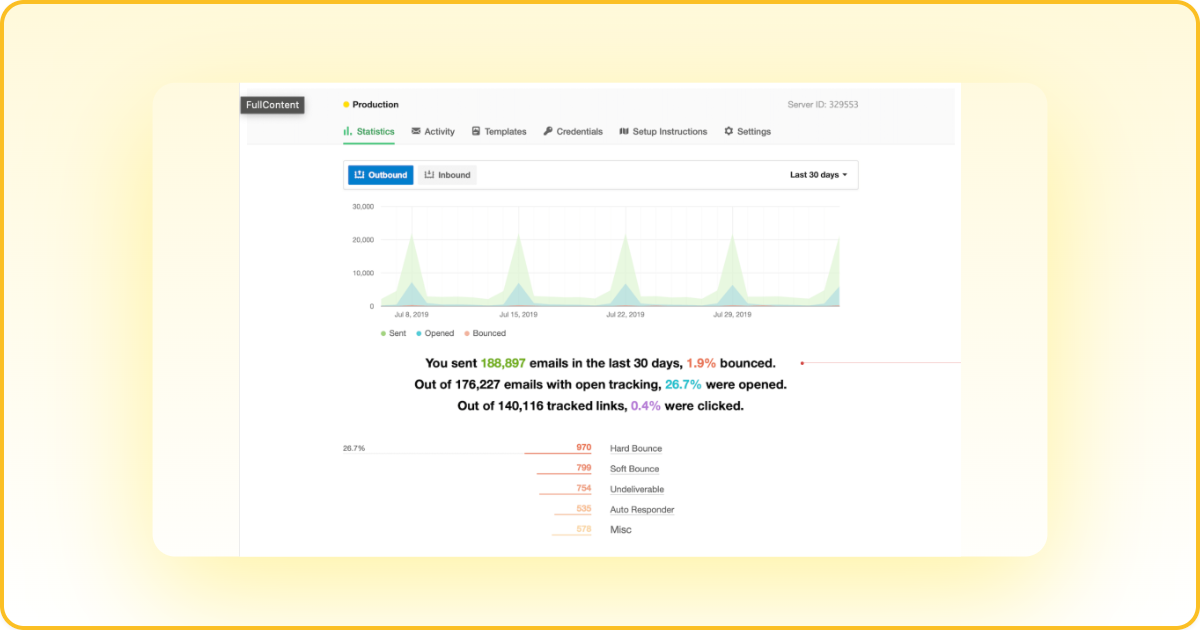
Postmark stores 45 days of full content history, which makes it easier for users to analyze and debug any issue. The users can identify the problem and use the help links to troubleshoot the concerns.
3. Ready to Use Email Templates
There is nothing more convenient for users than a wide variety of readymade templates to choose from. It saves a ton of their time in designing and editing the templates.
And the added benefit is that the templates are responsive, making them easy to consume for mobile users as well.
4. Prompt Support
An active support team comes free with Postmark’s plans that assist through emails, live chats, and one-on-one conversations.
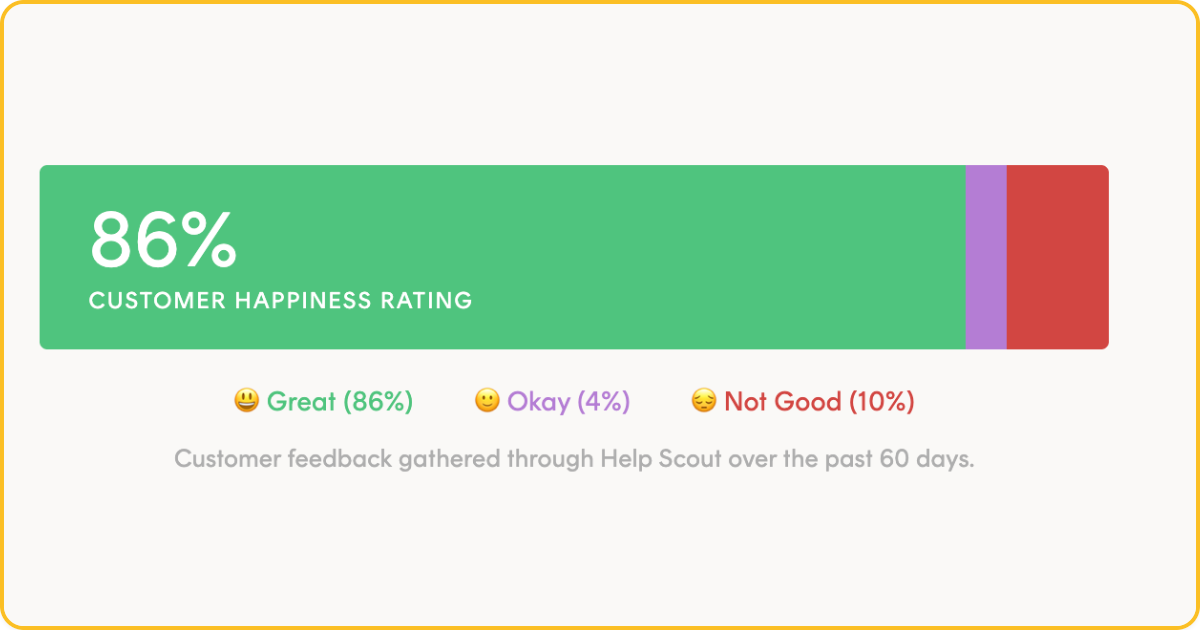
Postmark’s 86% of customers vouch for its smooth customer support services. And such strong customer advocacy plays a massive role in building a positive brand presence.
What are Postmark’s Prices & Plans?
Postmark now offers three tiered plans — Basic, Pro, and Platform — all starting at 10,000 emails per month, with overage-based pricing beyond that:
Free: $0/month for 100 emails. No credit card required, never expires — useful for API testing.
Basic: $15/month for 10,000 emails. Overages at $1.80 per 1,000 emails. Includes core sending, analytics, and 45-day message retention.
Pro (Most Popular): $16.50/month for 10,000 emails. Overages at $1.30 per 1,000. Adds dedicated IP support ($50/month per IP, 300K+ emails required), custom activity retention, and advanced analytics.
Platform: $18/month for 10,000 emails. Overages at $1.20 per 1,000. Includes unlimited Servers, Message Streams, and team member seats — designed for agencies and multi-product teams.

What Does This Mean For You?
The base pricing is affordable for small senders. However, overages add up quickly at scale — sending 100,000 emails on the Basic plan costs $15 + $162 in overages = $177/month.
Dedicated IPs are only available on Pro plans and above, with a $50/month per IP add-on and a minimum volume of 300,000 emails/month. DMARC monitoring is an additional $14/month per domain.
The free tier (100 emails/month) is useful for developers testing the API, but it’s too limited for any production sending.
What’s the Alternative to Postmark?
If you’re a high-volume sender outgrowing Postmark’s limits, or an ESP needing multi-tenant infrastructure, SendPost is purpose-built for your use case.
Here’s where SendPost differs from Postmark:
Self-service IP pool management: Create shared and dedicated IP pools, assign IPs to specific mail streams or subaccounts, and control automated warmup schedules — all self-service. Postmark’s dedicated IPs are managed by their team.
AI-driven deliverability monitoring: SendPost uses proactive ISP signal detection to catch deliverability issues before they impact your sending. Postmark’s monitoring is threshold-based and reactive.
Native multi-tenant architecture: Subaccounts with isolated sending environments, per-client IP pools, and dedicated analytics per tenant. Ideal for ESPs and platforms managing multiple clients.
Built-in email validation: Real-time and bulk validation API that detects MX failures, disposable domains, spam traps, and honeypot addresses. Postmark has no native email validation service.
Developer-ready integration: RESTful API with SDKs in 6 languages, plus standard SMTP relay support for easy migration from any provider.
For a detailed side-by-side breakdown, see our full Postmark vs SendPost comparison.
Why High-Volume Senders Choose SendPost
SendPost is built for scale. Whether you’re sending 100K or 100M emails per month, SendPost provides the infrastructure, monitoring, and deliverability tools that Postmark doesn’t offer at any tier.
Key advantages over Postmark at scale:
No volume caps — SendPost scales with your sending without arbitrary limits.
Lower total cost of ownership — Advanced features like IP pool management, email validation, and AI monitoring are included, not paid add-ons.
Enterprise-grade support — Hands-on deliverability specialists who understand high-volume sending challenges.
Ready to see how SendPost handles your volume? Book a demo to get started.
