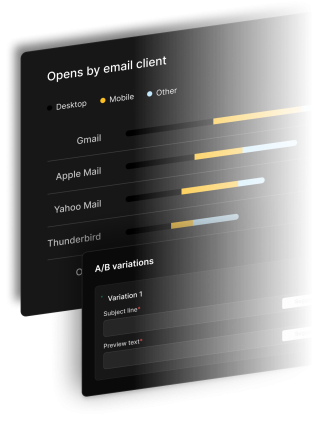
SendX gives you an AI-assisted editor, 400+ ready-to-send templates, precise audience targeting, and real-time campaign analytics. Email marketing returns $36 for every $1 spent (Litmus, 2024) — SendX gives you everything you need to capture your share.
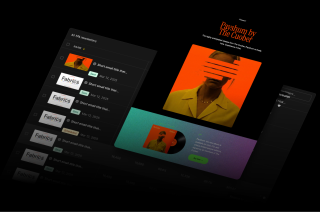
From first draft to post-send analytics, every part of the newsletter workflow is covered in SendX — without the complexity of tools built for enterprise teams.
Start from one of 400+ mobile-responsive templates or open the drag-and-drop editor and build from scratch. The SendX AI editor writes your first draft from a prompt — headline, body, and CTA — so you spend time refining instead of writing from a blank page. Personalize any of it with merge tags that pull each contact's first name, company, or any custom field you store — with fallback values so an empty field never leaves a blank in the sentence. Every template is mobile-responsive and renders cleanly in Gmail, Outlook, Apple Mail, and Yahoo.

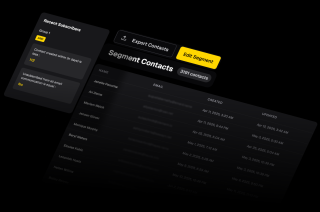
Select any list, tag, or smart segment as your campaign audience. Target contacts by behavior, custom field values, or engagement history — or combine conditions with AND/OR logic for exact precision. Sending to the right people is the single biggest lever for open rates and revenue per send.
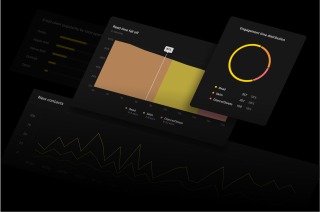
See open rates, click rates, bounces, unsubscribes, and conversions in real time after every send. Contacts who did not open get a 1-click resend — with a different subject line — without rebuilding the campaign. Spread sending distributes your volume over time to protect sender reputation on large lists.
What you actually click through, from opening a new campaign to picking the moment it lands.
SendX walks you through the campaign in order — verified sender, campaign type, design, then content — so nothing is half-configured when you reach the end. Pick the editor that suits the email, start from a template or an empty canvas, and drop in merge tags as you write. At any point you can send a test email to your own inbox and see exactly how it renders in a real email client before a single subscriber receives it.
Include or exclude by list, tag, or segment — and because segments are rule-based, contacts qualify in and out of them on their own as their behavior changes. That means the audience is evaluated fresh at the moment you send rather than inherited from a CSV somebody exported last week. Combine conditions with AND/OR to reach exactly who you mean, and exclude anyone who has already converted.
Send immediately, schedule a specific date and time, deliver in each contact's own local timezone, or turn on Smart Send and let SendX choose the moment each individual is most likely to open based on their own engagement history. UTM parameters are appended to your links automatically, so campaign traffic attributes correctly in your analytics without anyone hand-tagging URLs.

SendX walks you through the campaign in order — verified sender, campaign type, design, then content — so nothing is half-configured when you reach the end. Pick the editor that suits the email, start from a template or an empty canvas, and drop in merge tags as you write. At any point you can send a test email to your own inbox and see exactly how it renders in a real email client before a single subscriber receives it.
Include or exclude by list, tag, or segment — and because segments are rule-based, contacts qualify in and out of them on their own as their behavior changes. That means the audience is evaluated fresh at the moment you send rather than inherited from a CSV somebody exported last week. Combine conditions with AND/OR to reach exactly who you mean, and exclude anyone who has already converted.
Send immediately, schedule a specific date and time, deliver in each contact's own local timezone, or turn on Smart Send and let SendX choose the moment each individual is most likely to open based on their own engagement history. UTM parameters are appended to your links automatically, so campaign traffic attributes correctly in your analytics without anyone hand-tagging URLs.
Everything you need to know about SendX and our services. Last updated June 2026.
SendX includes 400+ professionally designed email templates, free on every plan. Templates are organized by industry, layout, and use case — newsletters, promotions, announcements, re-engagement, and more. Every template is mobile-responsive, so it renders correctly on desktop, mobile, and tablet without extra work. You can edit any template in the drag-and-drop editor without touching code, then save your version to reuse on future campaigns.
Yes. After a campaign sends, SendX identifies contacts who did not open it. You can resend to that group with a different subject line in one click — without rebuilding the campaign or re-selecting the audience. The resend goes only to confirmed non-openers. This is one of the most effective ways to recover missed opens without sending to your full list again.
Yes. SendX includes A/B Test as a dedicated campaign type for testing subject lines. You create Variant A and Variant B, choose what percentage of your audience receives the test, and set a wait duration. When the wait period ends, SendX automatically sends the winning variant to the rest of your audience. See A/B split testing for the full walkthrough.
Yes. When creating a campaign you can schedule it for any future date and time. SendX also supports time-zone-based sending — deliver the campaign at 9am in each recipient's local time zone rather than a single fixed time globally. For large lists, spread sending lets you distribute the send volume over a defined window to protect deliverability and avoid sudden spikes in outbound volume.
Yes. Insert merge tags anywhere in the campaign — subject line, preheader, or body — to pull dynamic contact data such as first name, company, or any custom field you have defined. Custom fields support text, date, dropdown, and checkbox types, so you can personalize on whatever data matters to your business. Every merge tag accepts a fallback value, so a contact with an empty field still receives a sentence that reads correctly rather than a blank space.
Still have questions? We're here to help.
"Our open rates are phenomenal. We get as high as
80% opens in some campaigns. We are using SendX for the past 2.5+ years. SendX works very well and perfectly fulfills the requirements of our marketing campaign."
Improve your campaigns by testing different emails with A/B Testing and hit the mark every time.
Automatically ramp sending volume to earn a rock‑solid sender reputation—no spreadsheets required.
Write, publish, and track articles without leaving SendX—turn readers into subscribers in minutes.
Filter out security‑scanner noise and see the clicks that actually matter.
Auto‑expire unsent emails so your audience only sees timely, relevant messages.
Give every campaign its own reply‑to address and make sure answers land in the right inbox—every time.
Most SendX customers have their first campaign drafted, targeted, and scheduled within an hour of signing up. Start your free trial — no credit card required.